Froggy,
I did a test on the current RDSS 2.0 Beta version. The smallest screen resolution I have access to is 800 x 600, so the 600 (vertical) is the same as your netbook and your 1024 width is 25% wider than my 800. Here is what my entire screen looks like right now at that resolution (
everything, top to bottom, left to right):
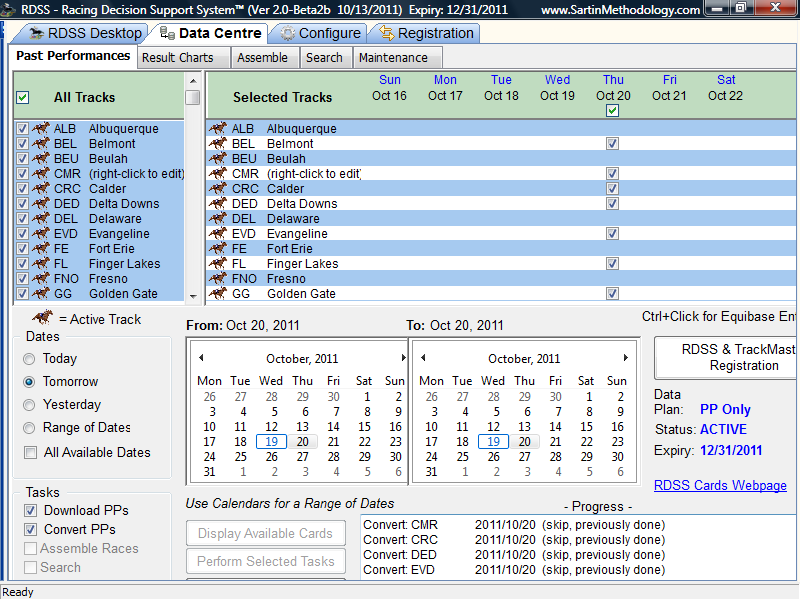
You will notice a lot less clutter at the top, which reveals more of the vertical screen.
However, to get that important
Perform Selected Tasks button, I had to change a setting in my Windows Taskbar to prevent it from always appearing on top of applications (thus giving more vertical room to RDSS and the Data Centre screen). To do this, right-click the Taskbar (usually found at the bottom of your Windows Desktop), choose Properties, then on the Taskbar Tab, uncheck 'Keep the Taskbar on top of other windows'. Then click OK. This will gain you a little more vertical room (depending on the height of your Taskbar), but hopefully enough to see the
Perform Selected Tasks button
.
You still can't access some check-boxes below the bottom edge, nor see most of the Progress window in case of errors. If I can make a few quick layout changes for Beta 2 (end of October?) it may get even better for you. (I won't be addressing the Data Centre in general until the final Beta 3 - because it works OK now, mostly). Re using RDSS 2.0 - all you have to do is ask (to Beta test it)

Check your email in a few minutes.
I have tested RDSS2 down to 768 vertical resolution and as Bill says it looks pretty flexible, but you can help me with feedback on 600 vertical. This will be valuable for deploying on tablet and phone size screens.
Good to hear from you again!
Ted